

当前位置:主页 > 雨林木风Win10系统教程 > >雨林木风WIN8系统禁用电脑USB接口的方法
雨林木风WIN8系统禁用电脑USB接口的方法
时间:2018-05-19 作者:雨林木风Win10系统 来源: www.ylmfwin100.com
雨林木风WIN8系统禁用电脑USB接口的方法
1、首先雨林木风WIN8系统打开记事本,复制下面的内容,粘贴进去。
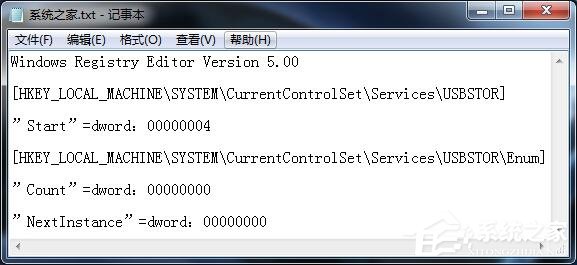
01Windows Registry Editor Version 5.0002[HKEY_LOCAL_MACHINE\SYSTEM\CurrentControlSet\Services\USBSTOR] 03”Start”=dword:0000000404[HKEY_LOCAL_MACHINE\SYSTEM\CurrentControlSet\Services\USBSTOR\Enum] 05”Count”=dword:00000000 06”NextInstance”=dword:00000000 复制代码
Windows Registry Editor Version 5.00 [HKEY_LOCAL_MACHINE\SYSTEM\CurrentControlSet\Services\USBSTOR] ”Start”=dword:00000004 [HKEY_LOCAL_MACHINE\SYSTEM\CurrentControlSet\Services\USBSTOR\Enum] ”Count”=dword:00000000 ”NextInstance”=dword:00000000
2、点【文件】-【另存为】,命名为disableusb.reg (注意“保存类型”选“所有”),保存到桌面。

3、再把“Start”=dword:00000004中的4改为3 ,同样另存为enableusb.reg ,保存到桌面。
以后要禁用USB时,双击disableusb.reg ,要解锁双击enableusb.reg即可。
相关文章
- 新萝卜家园 Ghost XP SP3 电脑城极速装机版 2014.08+
- 深度技术 GHOST XP SP3 通用装机版 2016.05
- 电脑公司 GHOST XP SP3 完美装机版 2016年09月
- 番茄花园 GHOST XP SP3 增强装机版 V2016.05
- 新萝卜家园 Ghost XP SP3 快速装机版 2015.05
- 老毛桃 GHOST XP SP3 标准装机版 2016.05
- 番茄花园 GHOST XP SP3 装机版 V2016.09
- 雨林木风 GHOST XP SP3 装机版 V2015.12
- 999宝藏网 Ghost XP SP3 绝对装机版 v2016.06
- 雨林木风 Ghost XP SP3 极速装机版 2014年9月版
雨林木风WIN10系统
- 1雨林木风Ghost Win10 64位 万能2021新年春
- 2雨林木风Ghost Win10x86 最新专业版 2021V0
- 3雨林木风Ghost Win10x86 推荐专业版 V2021
- 4雨林木风Ghost Win10x86 电脑城专业版 2021
- 5雨林木风Ghost Win10 x64 官方专业版 v2021
- 6雨林木风Windows10 极速2021新年春节版32位
- 7雨林木风 Win10 (2004) v2021.01 64位专业
- 8雨林木风 Win10(2004) v2021.01 32位专业
- 9雨林木风Ghost Win10 X64 家庭专业版 V2021
- 10雨林木风Ghost Win10 X64位 全新专业版 V20
雨林木风系统下载榜
 雨林木风Windows10 极速2021新年春节版32位
  雨林木风 Win10 (2004) v2021.01 64位专业版
  雨林木风Ghost Win10 X64位 全新专业版 V202104(自动激活)
  雨林木风Ghost Win10 x64 官方专业版 v2021年03月(无需激活)
  雨林木风 Win10(2004) v2021.01 32位专业版
  雨林木风Ghost Win10x86 稳定专业版 v202104(无需激活)
  雨林木风Ghost Win10 X64 家庭专业版 V2021.02月(永久激活)
  雨林木风Ghost Win10x86 电脑城专业版 2021v05(无需激活)